
Research Article 
 Creative Commons, CC-BY
A Graphical-User-Interface for Personalization of Hearing Aid Prescription in Audiology Clinics
*Corresponding author: Nasser Kehtarnavaz, Professor of Electrical and Computer Engineering Department, University of Texas at Dallas, Richardson, TX 75080, USA.
Received: February 05, 2025; Published: February 12, 2025
DOI: 10.34297/AJBSR.2025.25.003370
Abstract
Hearing aid fitting is normally done based on population-based prescriptions such as DSLv5 and NAL- NL2. While effective for baseline fitting, these prescriptions do not take into account an individual’s hearing preferences, particularly in a noisy audio environment that may be of interest to the individual, resulting in suboptimal hearing outcomes and reduced hearing aid satisfaction. This paper presents a Graphical-User-Interface (GUI) software tool named Personalization of Hearing Aids Amplification (PHAP) for personalizing hearing aid fittings. This GUI incorporates a previously developed multi-band Bayesian machine learning method to reach personalized settings via paired audio comparisons. By modeling each frequency band independently, this method significantly reduces the training time making this tool practical for achieving personalization. By streamlining the personalization process in a time-efficient manner, the developed GUI provides an effective means of incorporating user preference into fittings and paves the way for broader adoption of personalized hearing aid fitting in audiology clinics.
Keywords: Hearing aid personalization, Bayesian machine learning, Graphical User Interface for hearing aids, Personalized hearing aid fitting
Abbreviations: DRL: Deep Reinforcement Learning; MLIRL: Maximum Likelihood Inverse Reinforcement Learning; BML: Bayesian Machine Learning; GUI: Graphical-User-Interface; PHAP: Personalization of Hearing Aids Prescription; SNR: Signal-to-Noise Ratio; DB: Decibels.
Introduction
Hearing aid amplification prescriptive fitting is normally done based on population-based prescriptions such as DSLv5 [1-2] and NAL-NL2 [3], which provide gain settings across a number of frequency bands or channels commensurate with the degree of hearing loss. These prescriptions rely on a one-size-fits-all target for each frequency band derived from average population data, aiming to make soft sounds audible, moderate sounds comfortable and loud sounds tolerable at each frequency band. While effective in providing a baseline fitting, nearly half of hearing aid users express dissatisfaction with their hearing aid settings as these settings do not take into account a user’s auditory preferences in real-world audio environments faced by the user [4]. This lack of personalization often leads to suboptimal hearing outcomes and thus can reduce hearing aid satisfaction.
To address the limitations of the prescriptive approach, our research team developed and validated three machine learning-based methods to enable personalization of a hearing aid prescription. These methods include Deep Reinforcement Learning (DRL) [5-6], Maximum Likelihood Inverse Reinforcement Learning (MLIRL) [7- 10] and Bayesian Machine Learning (BML) [11-13]. Our first-generation machine learning method of DRL relied on offline training of a deep neural network. Although this method was found to improve word recognition performance in noise, it could not adapt to a user’s preferences in real-time. Our second-generation machine learning method of MLIRL overcame the real-time limitation of the first-generation method, but it involved over 200 paired comparisons (or approximately one hour of training time by a user) to reach an optimum personalized setting. Our third-generation machine learning method of BML has overcome the limitations of the first and second-generation methods. An overview of our third-generation method is presented in section 2.
In this work, we have developed a Graphical-User-Interface (GUI) for the clinical deployment of the third-generation method so that personalized hearing aid fitting can be easily carried out in audiology clinics. This GUI is designed for utilization by audiologists or hearing healthcare professionals so that they can conduct personalized hearing aid fitting in a time-efficient manner for audio environments of specific interest to individual hearing aid users.
Overview of Bayesian Machine Learning Method
Conventional hearing aid prescriptions, such as DSLv5 and NAL-NL2, provide a baseline amplification setting based on the audiometric data of a population with similar hearing loss. Such prescriptions do not take into account individual hearing preferences in noisy environments of particular interest to individual patients. In order to personalize conventional hearing aid fittings to enable more optimal hearing in challenging audio environments, machine learning methods have been utilized to achieve hearing aid personalization based on a series of feedbacks from the user [14-20].
To achieve personalization of hearing aid fitting with reduced user effort, a multi-band Bayesian Machine Learning (BML) method was developed in [11] to systematically model hearing preferences in each frequency band. The method utilizes a Gaussian process- based preference function to capture a user’s preferred gain adjustments in a number of frequency bands across multiple levels. Bayesian inference is used to iteratively refine these preferences via paired comparisons, that is by a user selecting between two presented amplification settings of an audio signal. By treating each frequency band independently, this method provides a time-efficient adaptation of gain values, thus reducing the number of required paired comparisons. Unlike the methods that require long exhaustive training sessions, the Bayesian framework identifies a user-preferred gain setting with far fewer paired comparisons, making it practical for deployment in audiology clinics.
A key feature of this method is its trajectory generation mechanism, which ensures that a user is presented with diverse and distinct gain curves rather than redundant comparisons. This method has been validated by participant testing and it has been shown that users prefer personalized gain settings more often than standard prescriptive gain settings with no adverse impact on speech recognition [11- 13].
Building on this method, an interactive GUI has been developed in this paper to enable deployment of the personalization in audiology clinics. This GUI incorporates the BML method to efficiently personalize gain values across a pre-specified number of frequency bands. While currently supporting the DSLv5 prescription, it is designed to be flexible and extendable to other prescriptions, such as NAL- NL2 and ADRO [21], ensuring broad applicability for clinical utilization.
The GUI facilitates the personalization process by enabling audiologists to refine hearing aid settings through a streamlined approach involving paired comparisons of audio signals. By minimizing the training time for the personalization, the cognitive demand on users is reduced. Unlike conventional static prescriptive methods, this interactive real-time GUI ensures that users receive amplification settings that are tailored to their specific preferences and needs, paving the way for broader adoption of personalized hearing aid fitting in clinical practice.
Graphical-User-Interface for Personalized Hearing Aid Fitting
The GUI, named Personalization of Hearing Aids Prescription (PHAP), has been designed to streamline the process of personalized hearing aid fitting by enabling audiologists to manage user data, customize gain values and evaluate performance in a time-efficient manner. The following sub-sections outline the key functionalities of the GUI and the overall benefits it offers for clinical as well as research use.
System Design and Methodology
PHAP is organized into five main tabs: Data Folders, User Profile, Training, Preference Testing and Speech Testing. The Data Folders tab (see Figure 1a) provides buttons to access different folders, including user profiles, audio files, noise files, training data and word recognition data, enabling a streamlined file management. The User Profiles Folder contains user profiles, including prescriptive gain values for soft, moderate, and loud speech levels, serving as the starting point or the initial condition for the personalization training. The Audio Files Folder stores speech sound files used in training and testing, which are amplified according to selected gain values. The Noise Files Folder holds generic or user-recorded noise files from real-world environments where the user has trouble hearing conversations. These noise files are also used during testing. The Training Data Folder stores the personalized gain values obtained from the training session, which are later used in the preference testing. The Word Recognition Data Folder contains word lists and test results from speech recognition sessions, including sentence and word recognition tests.
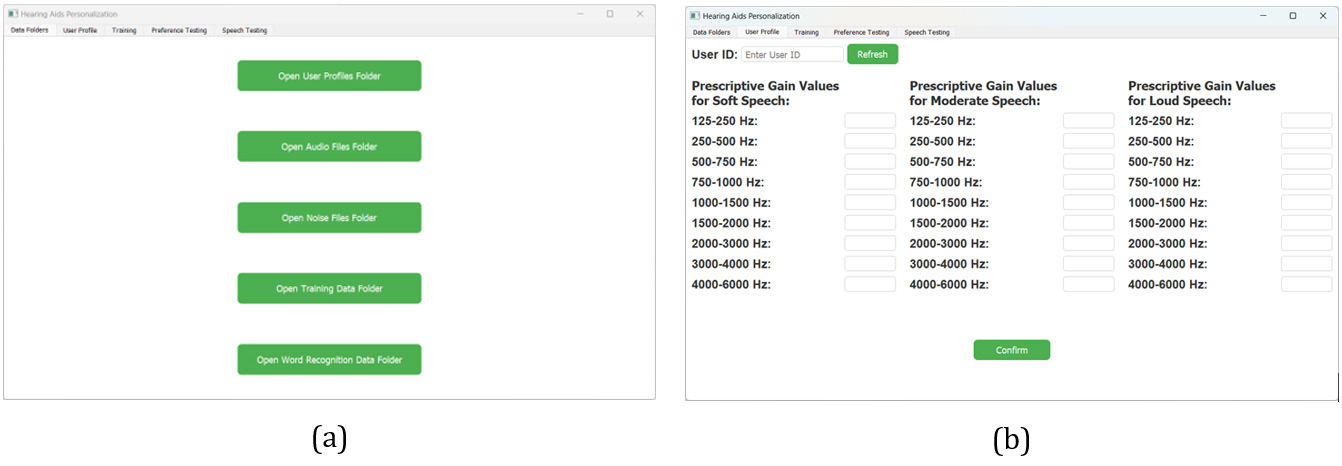
Figure 1: PHAP GUI: (a) The Data Folders tab for managing user profiles, audio files, noise files, training data and word recognition data; (b) The User Profile tab for entering user ID and prescriptive gain values for different speech levels and frequency bands.
In the User Profile tab (see Figure 1b), audiologists or hearing care professionals can input a user’s unique ID, refresh a user’s data and enter prescriptive gain values for different speech levels (soft, moderate, loud) and frequency bands with an option to confirm the changes. The system allows flexibility in inputting gain values-users can enter values for all nine frequency bands, or specify values for only five or any subset of bands, and the remaining bands will be automatically filled using linear interpolation.
The Training tab (see Figure 2) allows audiologists or hearing care professionals to select a user profile, audio file, noise file and signal-to-noise ratio (SNR), which determines the level of noise present in the combined signal plus noise audio output. The lists of available audio and noise files are automatically generated by detecting files in the corresponding folder within the Data Folder tab. The mixing of audio and noise is performed in a real-time framebased manner. The options of noise reduction and directionality can also be enabled. Audiologists can choose specific gain values for different speech levels to personalize and initiate the training process using the Launch Training button, supported by a graph displaying the prescription gain values in decibels (dB). The Refresh button can be used to reset all the fields in the Training tab.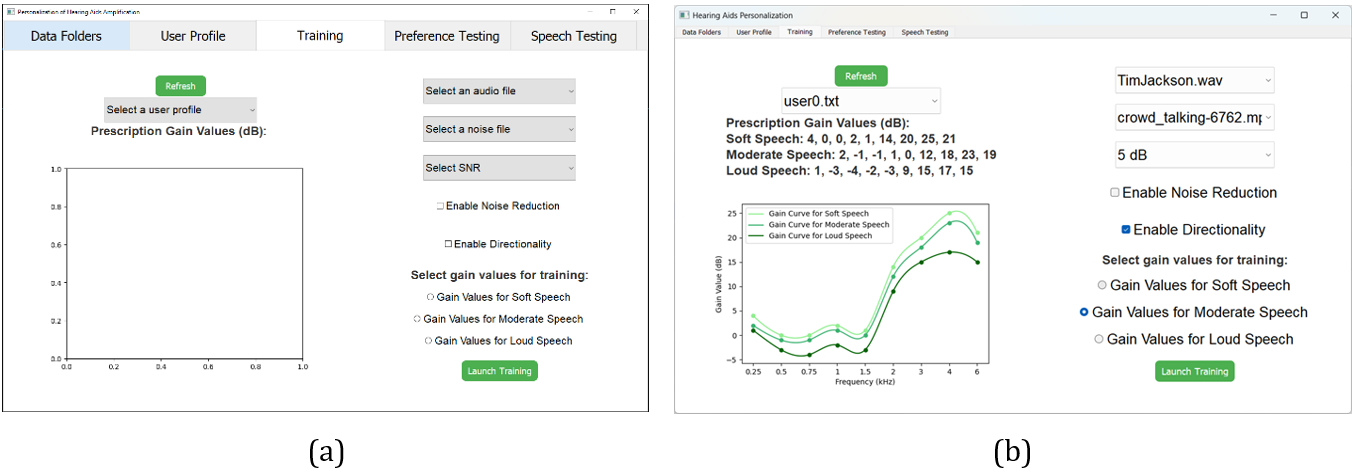
Figure 2: The Training tab of the PHAP GUI allowing selection of user profiles, audio settings, gain values and training options: (a) Initial training interface without any selection made; (b) Training session in progress, displaying user-specific prescription gain values for different speech levels (soft, moderate, loud) and their corresponding gain curves across frequency bands.
During the training session, a separate window (see Figure 3) opens to conduct paired comparisons, where audiologists or hearing care professionals monitor the GUI while the user indicates their preferences across 28 paired comparisons. This process culminates in determining the personalized gain values preferred by the user. The training interface facilitates user-driven gain selection by presenting users with paired comparisons of gain settings across the frequency bands. At the top of the interface, the text Iteration 1 indicates that this is the first step of the training process. Below this, three buttons labeled Gain A, Gain B and Disable Gain and Same allow applying and comparing different gain settings. The Prefer A and Prefer B buttons enable the user to indicate which gain setting is more suitable with the Same button indicating the same preference, while the Confirm and Next button finalizes the user’s selection and proceeds to the next iteration. Below these controls, two gain values are displayed in dB for Gain A and Gain B, representing different amplification levels across the frequency bands. A graph at the bottom visualizes these gain curves, with red (Gain A) and blue (Gain B) lines representing how the gain values vary across different frequency bands in kHz and different paired comparisons. The graphs allow a visual comparison between the two gain settings.
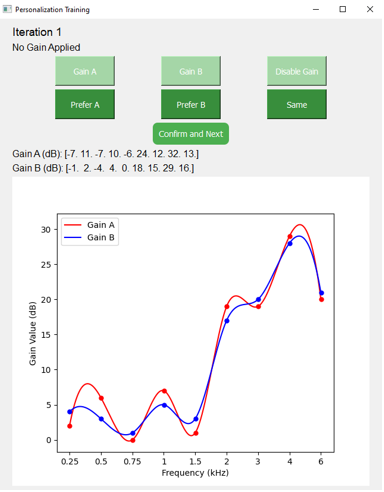
Figure 3: The Personalization Training interface of the GUI PHAP where users select between two gain settings (Gain A and Gain B) across different frequency bands.
The Preference Testing tab is designed to compare amplified audio signals between the personalized gain values obtained from the Personalization Training interface of the Training tab and the prescriptive DSLv5 gain values originally entered into the User Profile tab.
Similar to the Personalization Training interface, this interface (see Figure 4) allows users to evaluate different gain settings in a structured manner. On the left side of the interface, the dropdown menus enable the selection of an audio file, noise file and SNR level. The prescriptive gain values for soft, moderate and loud speech are also displayed. Audiologists or hearing healthcare professionals also have the option to enable or disable noise reduction and directionality before conducting the preference testing. On the right side, the personalized gain values are shown in dB, along with a graph comparing the prescriptive and personalized gain curves across different frequency bands. The green curve represents the prescriptive gain curve while the yellow curve represents the personalized gain curve, helping audiologists to assess differences visually. It also has buttons at the bottom to test the amplified audio either via hearing aids or the GUI itself. The Amplification by Hearing Aids button plays the original audio file through hearing aids using the pre-programmed prescriptive and personalized gain settings. The Amplification by GUI button plays the audio file with the amplification applied by the GUI. The amplified sound is then sent to hearing aids which are set to a flat gain.
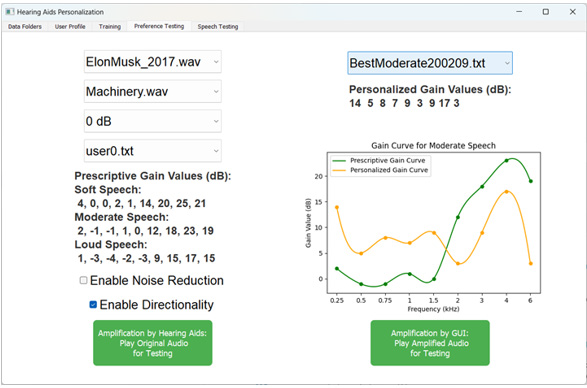
Figure 4: The Preference Testing tab of the PHAP GUI allowing users to compare prescriptive and personalized gain values for a selected audio scenario.
Figure 5 displays the preference selection interface that appears during the Preference Testing phase of the GUI. The left interface appears when the Amplification by Hearing Aids option is selected. Users are presented with three choices: Prefer Personalized Gain Values, Prefer Prescriptive Gain Values and No Preference. The right interface appears when the Amplification by GUI option is selected. It has the same three preference options but includes two additional buttons at the top: Standard Gain and Personalized Gain. The user can compare both versions before making a final selection and saving the result. This structured approach ensures that preference testing is consistent and objective, helping audiologists determine whether the personalized gain setting improves a user’s listening experience.
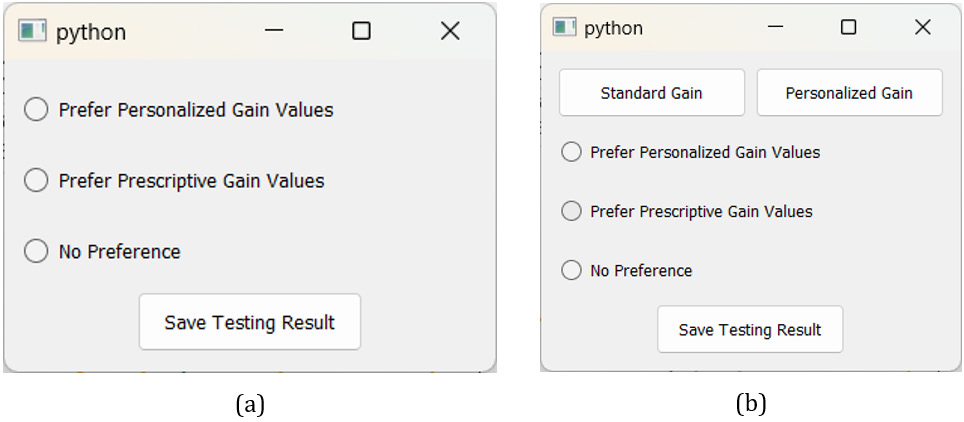
Figure 5: Preference selection interface during Preference Testing: (a) The interface shown when Amplification by Hearing Aids is selected, allowing users to choose their preferred gain settings without direct switching between gain types; (b) The interface shown when Amplification by GUI is selected, providing additional buttons for users to switch between Prescriptive and Personalized Gain Values before making their selection.
Lastly, as shown in Figure 6, the Speech Testing tab of the GUI is designed to evaluate speech recognition performance under different amplification settings. This tab allows audiologists to compare the prescriptive and personalized gain settings by conducting word and sentence recognition tests. The process begins with selecting a user profile which loads the saved personalized gain values for testing. Audiologists can then choose to apply a selected background noise and enable the additional features of noise reduction and directionality. The next step involves selecting either a word list for word recognition testing or a sentence list for sentence recognition testing. Once the configurations are set, audiologists can initiate the speech recognition tests using either the GUI-applied amplification or the amplification settings pre-programmed into the hearing aids used by the user. A graph on the interface displays prescriptive vs. personalized gain curves, helping audiologists to assess differences in gain settings visually. This structured speech testing approach ensures that audiologists can evaluate the effectiveness of personalized amplification in improving speech comprehension under various audio conditions.
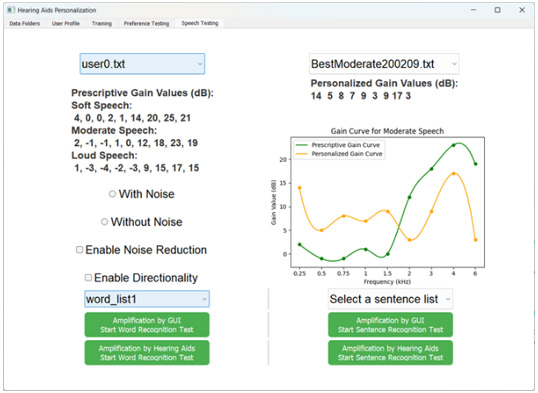
Figure 6: Speech Testing tab of the PHAP GUI which enables evaluation of speech recognition performance with prescriptive and personalized gain settings.
During the word recognition testing, the GUI presents an interactive Trial Sub window shown in Figure 7. In this testing, the user listens to a played audio trial by clicking the Play Trial button. The displayed word (e.g., East in the figure) represents the target word the user is expected to recognize. After listening to the audio, the user is required to repeat the word and audiologists or hearing healthcare professionals indicate whether the user correctly identified the word by selecting either the Correct or Wrong button. This step is crucial for evaluating how well the user understands speech under different amplification conditions. Below the buttons, the frequency bands (Hz) and corresponding gain values (dB) used in the trial are displayed, showing the amplification settings applied during the testing.
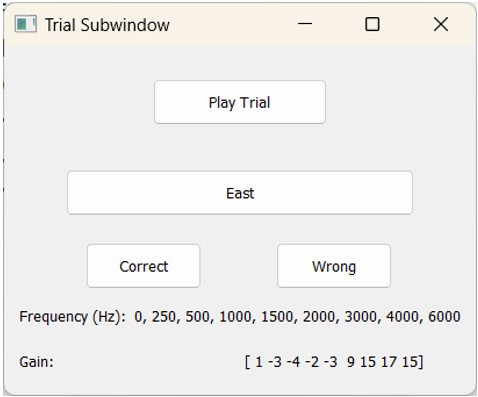
Figure 7: Trial Sub window during the word recognition testing, where a user listens to an audio trial and audiologists determine whether the user correctly identified the presented word.
By systematically collecting a user’s responses, this testing module helps audiologists assess the effectiveness of the personalized gain setting in enhancing speech comprehension. The results from multiple trials allow for comparisons between the prescriptive and personalized gain settings, ultimately guiding adjustments for improved hearing experience.
Implementation and Development Framework
The PHAP GUI software tool has been developed to enable audiologists or hearing healthcare professionals to personalize hearing aid amplification based on an individual’s auditory preferences in the presence of background noise. The GUI has been implemented using a Python-based framework, integrating third-party libraries to support its functionalities, including signal processing, data visualization and Bayesian machine learning.
For ease of deployment, the software is designed to run on Windows and macOS. On Windows machines, it can be launched directly via an executable file without requiring additional installation. On macOS machines, or for research purposes requiring software modifications, execution is supported through Jupyter Notebook, ensuring flexibility for further extension in controlled research settings. By combining an intuitive user interface with a robust personalization framework, this tool enhances the ability of audiologists to optimize hearing aid amplification for an individual user in a practical way.
Conclusion and Future Work
In this paper, a GUI named PHAP is developed to provide an intuitive and structured software tool for audiologists and hearing healthcare professionals to personalize hearing aid fitting based on an individual’s hearing preferences. By integrating a multiband Bayesian machine learning method, this software tool allows conducting real-time gain adjustments, significantly improving the efficiency (within 10 minutes) of the hearing aid fitting process compared to traditional prescriptive methods. Through its training, preference testing and speech testing modules, the developed GUI systematically refines gain settings, ensuring that users receive customized amplification in accordance with their specific listening needs and audio environments. The interactive nature of the GUI including paired comparisons, real-time gain visualization and word recognition testing ensures that hearing aid users experience optimized settings. Additionally, its flexibility structure to accommodate other prescriptions, such as DSLv5, NAL-NL2 and ADRO, makes it adaptable to various clinical workflows.
While the Bayesian machine learning method embedded in this software tool has been validated in prior research, future work will focus on its utilization in a clinic. By streamlining the personalization process, this software tool serves as a powerful tool for audiologists and hearing healthcare professionals, providing data- driven, personalized hearing aid fittings for improved hearing in real- world audio environments.
Conflict of Interest
The authors declare no conflicts of interest.
References
- Bagatto M, Moodie S, Scollie S, Seewald R, Moodie S, et.al. (2005) Clinical protocols for hearing instrument fitting in the Desired Sensation Level method. Trends Amplif 9(4): 199-226.
- Polonenko MJ, Scollie SD, Moodie S, Seewald RC, Laurnagaray D, et.al. (2010) Fit to targets, preferred listening levels, and self-reported outcomes for the DSLv5 hearing aid prescription for adults. Int J Audiol 49(8): 550-560.
- Keidser G, Dillon H, Flax M, Ching T, Brewer S (2011) The NAL-NL2 prescription procedure. Audiol Res 1(1): e24.
- Tasnim NZ, Ni A, Lobarinas E, Kehtarnavaz N (2024) A review of machine learning approaches for the personalization of amplification in hearing aids. Sensors 24(5): 1546.
- Alamdari N, Lobarinas E, Kehtarnavaz N (2020) Personalization of hearing aid compression by human-in-the-loop deep reinforcement learning. IEEE Access 8: 203503-203515.
- Akbarzadeh S, Alamdari N, Campbell C, Lobarinas E, Kehtarnavaz N (2020) Word recognition clinical testing of personalized deep reinforcement learning compression. 2020 IEEE 14th Dallas Circuits and Systems Conference (DCAS), USA pp. 1-2.
- Akbarzadeh S, Lobarinas E, Kehtarnavaz N (2022) Online personalization of compression in hearing aids via maximum likelihood inverse reinforcement learning. IEEE Access 10:58537-58546.
- Ni A, Lobarinas E, Kehtarnavaz N (2023) Personalization of hearing aid DSLV5 prescription amplification in the field via a real-time smartphone app. 24th International Conference on Digital Signal Processing (DSP), Greece pp. 1-5.
- Ni A, Akbarzadeh S, Lobarinas E, Kehtarnavaz N (2022) Personalization of hearing aid fitting based on adaptive dynamic range optimization. Sensors 22(16): 6033.
- Ni A, Kehtarnavaz N (2023) A real-time smartphone app for field personalization of hearing enhancement by adaptive dynamic range optimization. 5th International Congress on Human- Computer Interaction, Optimization and Robotic Applications (HORA), Turkey pp. 1-6.
- Ni A, Lobarinas E, Kehtarnavaz N (2024) Efficient personalization of amplification in hearing aids via multi-band Bayesian machine learning. IEEE Access 12:112116-112123.
- Ni A, Lobarinas E, Kehtarnavaz N (2024) Field deployment of personalized DSLv5 hearing aid amplification by Bayesian machine learning. 21st International Conference on Electrical Engineering, Computing Science and Automatic Control (CCE), Mexico pp. 1-6.
- Tasnim NZ, Ni A, Lobarinas E, Kehtarnavaz N (2024) Personalization and smartphone implementation of ADRO hearing aid amplification by Bayesian machine learning. 21st International Conference on Electrical Engineering, Computing Science and Automatic Control (CCE), Mexico pp. 1-6.
- Birlutiu A, Groot P, Heskes T (2010) Multi-task preference learning with an application to hearing aid personalization. Neurocomputing 73(7-9): 1177-1185.
- Mondol SR, Lee S (2019) A machine learning approach to fitting prescription for hearing aids. Electronics 8(7): 736.
- Nielsen JBB, Nielsen J, Larsen J (2014) Perception-based personalization of hearing aids using Gaussian processes and active learning. IEEE/ACM Transactions on Audio, Speech, and Language Processing 23(1): 162-173.
- Mondol S, Kim HJ, Kim KS, Lee S (2022) Machine learning-based hearing aid fitting personalization using clinical fitting data. Journal of Healthcare Engineering 2022: 1667672.
- Jensen NS, Balling LW, Nielsen JBB (2019) Effects of personalizing hearing-aid parameter settings using a real-time machine-learning approach. 23rd International Congress on Acoustics, Germany.
- Vyas D, Brummet R, Anwar Y, Jensen J, Jorgensen E, et al. (2022) Personalizing over- the-counter hearing aids using pairwise comparisons. Smart Health 23: 100231.
- Ypma A, Geurts J, Ozer S, Van der Werf E, De Vries B (2008) Online personalization of hearing instruments. EURASIP Journal on Audio, Speech, and Music Processing. 2008: 183456.
- Blamey PJ (2005) Adaptive dynamic range optimization (ADRO): A digital amplification strategy for hearing aids and cochlear implants. Trends in Hearing 9(2): 77-98.




 We use cookies to ensure you get the best experience on our website.